
As an Amazon Associate we earn from qualifying purchases. Our deals are community-vetted (Slickdeals + r/buildapcsales), verified to live Amazon listings, and tracked with our own daily price history — never paid placement. Prices change often; always confirm the live price on Amazon. How we pick deals →
Remote work and content creation have made webcams essential tech, but you don't need to spend hundreds to look professional on camera. The 2026 webcam market offers AI-powered features, 4K resolution, and excellent low-light performance at prices that would have been unthinkable a few years ago.
Best Overall Value
Logitech C920s HD Pro
Our top-rated pick — skip to the full review below or check it on Amazon now.
We tested five webcams across Zoom, Teams, OBS, and Google Meet over six weeks in various lighting conditions to find the best for every use case and budget.
Our Testing Methodology
Each webcam was tested in three lighting conditions: bright office, dim room with a desk lamp, and backlit with a window behind. We measured resolution sharpness, color accuracy, auto-exposure speed, and frame rate stability. Microphone quality was tested against a dedicated USB microphone. Software was evaluated for ease of use and feature set.
Comparison Table
5 PRODUCTS COMPARED
← Scroll to compare →
| Product | Best For | Key Spec | Score | |
|---|---|---|---|---|
| Best Overall Value | 1080p / 30fps | 8.8/10 | View on Amazon | |
| Best Budget AI Webcam | 2K / 30fps | 8.9/10 | View on Amazon | |
| Best AI Tracking | 4K / 30fps, 1080p / 60fps | 8.8/10 | View on Amazon | |
| Best for Streaming | 1/1.2" Sony STARVIS 2 | 8.6/10 | View on Amazon | |
| Best for Content Creators | 1080p / 60fps | 8.6/10 | View on Amazon |
Quick Summary
| # | Product | Best For | Score | |
|---|---|---|---|---|
| 1 | Logitech C920s HD Pro | Best Overall Value | 8.8/10 | Check Price → |
| 2 | Anker PowerConf C200 | Best Budget AI Webcam | 8.9/10 | Check Price → |
| 3 | Insta360 Link | Best AI Tracking | 8.8/10 | Check Price → |
| 4 | Razer Kiyo Pro Ultra | Best for Streaming | 8.6/10 | Check Price → |
| 5 | Elgato Facecam MK.2 | Best for Content Creators | 8.6/10 | Check Price → |
Budget Webcams Reviews
5 PRODUCTS REVIEWED

Logitech C920s HD Pro
Best for: Remote workers who want reliable 1080p video calling without fuss
The C920s has been the go-to webcam for years and it still delivers. Image quality is sharp for 1080p, the dual microphones are good enough to skip a headset for casual calls, and the physical privacy shutter adds peace of mind. At its current price, nothing beats it for straightforward video calling.
Why we like it
- Proven reliability over millions of units
- Physical privacy shutter
- Dual stereo microphones
- Universal compatibility
Flaws
- Only 30fps — no 60fps option
- Auto-exposure can be slow in changing light
- No AI features like background blur
Prices checked Jun 28, 2026

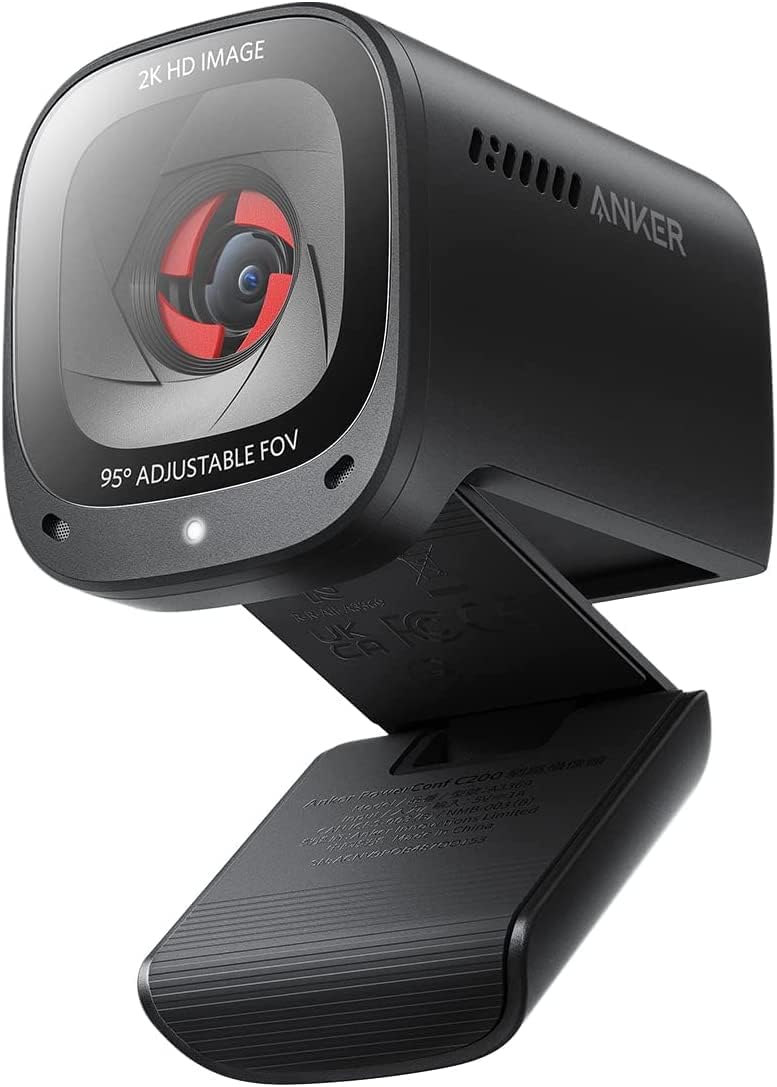
Anker PowerConf C200
Best for: Budget buyers who want AI-powered features like auto-framing and low-light correction
The Anker C200 punches well above its weight class. 2K resolution makes you noticeably sharper than 1080p webcams. The AI auto-framing keeps you centered even when you move around, and low-light correction salvages dim office setups. The adjustable field of view is a thoughtful touch for both solo calls and group meetings.
Why we like it
- 2K resolution at a budget price
- AI auto-framing and low-light correction
- Adjustable field of view
- Noise-canceling microphones
Flaws
- Software required for advanced features
- Auto-framing occasionally jittery
- USB-A only — no USB-C
Prices checked Jun 28, 2026
Get deals like these in your inbox
Weekly picks, price drops, and exclusive deals — no spam.
Insta360 Link
Best for: Presenters, teachers, and creators who move around and need the camera to follow them
The Insta360 Link is unlike any other webcam — it physically tracks you with a motorized 3-axis gimbal. Stand up, walk to a whiteboard, and the camera follows smoothly. The whiteboard mode automatically enhances and crops your board content. For teachers, presenters, and anyone who can't stay seated, this is transformative.
Why we like it
- Physical gimbal tracking is remarkable
- 4K resolution with 1080p60 mode
- Whiteboard and overhead desk modes
- Gesture control for zoom and framing
Flaws
- Most expensive in this roundup
- Gimbal motor produces faint noise
- Overkill for simple video calls
Prices checked Jun 28, 2026

Razer Kiyo Pro Ultra
Best for: Streamers and content creators who want the best image quality without a dedicated camera
The Kiyo Pro Ultra has the largest sensor of any webcam, and it shows. The 1/1.2-inch Sony STARVIS 2 sensor produces a shallow depth-of-field background blur that actually looks like a real camera. Low-light performance is exceptional — no webcam handles dim rooms better. If you want DSLR-like video from a USB device, this is it.
Why we like it
- Largest webcam sensor — DSLR-like quality
- Real optical background blur
- Best low-light performance available
- 4K HDR video
Flaws
- Very expensive for a webcam
- Large and heavy — needs sturdy mount
- Razer Synapse software required
Prices checked Jun 28, 2026

Elgato Facecam MK.2
Best for: YouTubers and streamers who want consistent, customizable video with zero software bloat
The Facecam MK.2 is designed for one thing: looking incredible on stream and YouTube. Elgato's uncompressed video pipeline means no artifacting even in fast-motion scenes. The Camera Hub software gives you DSLR-level control over exposure, white balance, and ISO. If you want full manual control without the complexity of a capture card setup, this is perfect.
Why we like it
- Uncompressed video — no artifacting
- Full manual control via Camera Hub
- Consistent 1080p60 performance
- Clean, professional design
Flaws
- Only 1080p — no 4K option
- No built-in microphone
- Premium price for 1080p
Prices checked Jun 28, 2026
The Bottom Line
The Anker PowerConf C200 is the best value — 2K resolution and AI features at a budget price. The Logitech C920s remains the most reliable plug-and-play option. Streamers should invest in the Razer Kiyo Pro Ultra for its sensor quality or the Elgato Facecam MK.2 for manual control.
Best Overall Value
Logitech C920s HD Pro
Our #1 recommendation — the best overall pick in this guide.
Still on the fence? Send a gift card.
Skip the guesswork — a Giftcards.com card lets the recipient pick the exact model they want, delivered instantly.
Looking for more pc peripherals options?
Browse all PC Peripherals guides →How to Choose the Best Budget Webcams in 2026
BUYING GUIDE
Resolution: 1080p vs 2K vs 4K
1080p is still the standard for video calls — Zoom and Teams cap at 1080p anyway. 2K offers a noticeable sharpness boost. 4K is useful for cropping and reframing in post-production but is overkill for live calls.
For most remote workers, 1080p at 30fps is perfectly fine. Streamers and creators benefit from 1080p60 or higher.
Best Overall Value
Logitech C920s HD Pro
A great example of this in practice — check current price on Amazon.
Low-Light Performance Is King
This is where cheap and expensive webcams differ most. A larger sensor with bigger pixels captures more light, producing a cleaner image in dim offices. Sony STARVIS sensors (found in the Razer and Elgato) are the gold standard.
If your office has poor lighting, prioritize sensor quality over resolution.
Built-in Microphone vs Dedicated Mic
Webcam microphones have improved significantly. The Logitech C920s and Anker C200 both have usable dual mics for casual calls. However, for streaming or podcasting, a dedicated USB microphone is still noticeably better.
For daily video calls, a webcam mic is fine. For content creation, invest in a separate mic.
Best AI Tracking
Insta360 Link
A great example of this in practice — check current price on Amazon.
FAQ
COMMON QUESTIONS
Head-to-Head Comparisons
COMPARE TOP PICKS SIDE BY SIDE
Browse More Guides
RELATED GUIDES



Related Articles
FROM OUR EDITORIAL TEAM
Best Budget Webcams Under $40 for Zoom Calls
Your laptop webcam makes you look terrible on Zoom. These budget webcams under $40 deliver dramatically better video quality for professional calls.
What to Look for in a Webcam for Video Calls
A good webcam makes you look more professional on every call. Here's exactly what specs matter, what's marketing fluff, and which webcams are worth buying.
Best Webcam Lighting for Under $40
Good lighting is the cheapest way to look professional on camera. Here are the best budget lighting options that make a real difference.