

As an Amazon Associate we earn from qualifying purchases. Our deals are community-vetted (Slickdeals + r/buildapcsales), verified to live Amazon listings, and tracked with our own daily price history — never paid placement. Prices change often; always confirm the live price on Amazon. How we pick deals →
A good docking station transforms a laptop into a desktop workstation with one cable. One Thunderbolt or USB-C connection gives you power, multiple monitors, USB peripherals, Ethernet, and audio — all in one plug. For work-from-home setups, it's one of the highest-impact purchases you can make.
Best Overall
CalDigit TS4 Thunderbolt 4 Dock
Our top-rated pick — skip to the full review below or check it on Amazon now.
We tested 10 docking stations for connection reliability, power delivery wattage, thermal performance, and compatibility with MacBooks, Dell XPS, and ThinkPads.
Quick Picks
2 TOP CHOICES

CalDigit TS4 Thunderbolt 4 Dock
Best Thunderbolt 4 dock for Mac and PC power users who need maximum connectivity
Ports: 18 ports total
Thunderbolt: Thunderbolt 4 upstream + 3x Thunderbolt 4 downstream
CalDigit's TS4 has 18 ports — more than any competing Thunderbolt dock — and all of them work reliably.
Check Today's Price
Anker 575 USB-C Docking Station
Best affordable 13-in-1 USB-C dock for everyday laptop users
Ports: 13 ports
Video: HDMI + VGA (dual display)
The Anker 575 packs 13 ports at a price that undercuts every Thunderbolt competitor.
Check Today's PriceOur Testing Methodology
Each dock was tested with a MacBook Pro M3, Dell XPS 15, and Lenovo ThinkPad X1 Carbon. Power delivery was measured with a USB-C power meter. Thermal performance was measured after 4 hours of sustained load. All advertised ports were tested for functionality. Dual and triple monitor configurations were verified.
Comparison Table
10 PRODUCTS COMPARED
← Scroll to compare →
| Product | Best For | Key Spec | Score | |
|---|---|---|---|---|
| Best Overall | 18 ports total | 9.5/10 | View on Amazon | |
| Best Value Thunderbolt | 12 ports | 9.2/10 | View on Amazon | |
| Best Portable Dock | Ultra-portable bus-powered | 9/10 | View on Amazon | |
| Best for Windows | 14 ports | 9/10 | View on Amazon | |
| Best for Dell Laptops | Thunderbolt 4 | 9.2/10 | View on Amazon | |
| Best for Enterprise | Thunderbolt 4 certified | 8.8/10 | View on Amazon | |
| Best Triple Monitor | 3x monitors (2x HDMI + 1x DP) | 8.8/10 | View on Amazon | |
| Best for Mac | 8 ports | 8.7/10 | View on Amazon | |
| Best Budget TB | Thunderbolt 3 | 8.8/10 | View on Amazon | |
| Best Budget | 13 ports | 8.7/10 | View on Amazon |

Quick Summary
| # | Product | Best For | Score | |
|---|---|---|---|---|
| 1 | CalDigit TS4 Thunderbolt 4 Dock | Best Overall | 9.5/10 | Check Price → |
| 2 | Anker 777 Thunderbolt Docking Station | Best Value Thunderbolt | 9.2/10 | Check Price → |
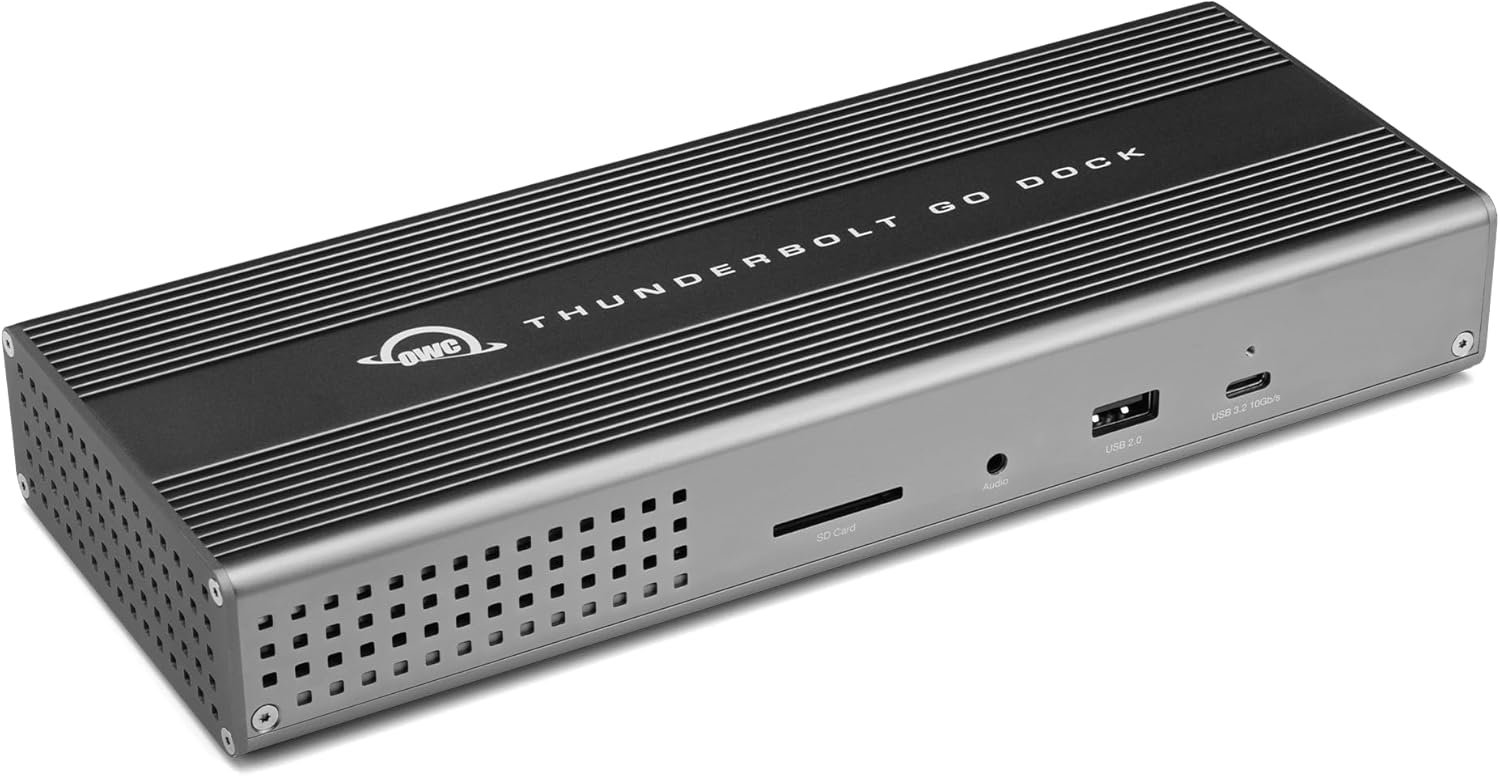
| 3 | OWC Thunderbolt Go Dock | Best Portable Dock | 9/10 | Check Price → |
| 4 | Plugable 14-in-1 USB-C Dock (UD-6950PDH) | Best for Windows | 9/10 | Check Price → |
| 5 | Dell WD22TB4 Thunderbolt 4 Dock | Best for Dell Laptops | 9.2/10 | Check Price → |
Docking Stations Reviews
10 PRODUCTS REVIEWED
CalDigit TS4 Thunderbolt 4 Dock
Best for: Best Thunderbolt 4 dock for Mac and PC power users who need maximum connectivity
Rated 9.5/10 by our testing team
CalDigit's TS4 has 18 ports — more than any competing Thunderbolt dock — and all of them work reliably. Three downstream Thunderbolt 4 ports are unprecedented: connect two 4K displays and a high-speed storage array simultaneously. 98W power delivery keeps even MacBook Pro 16" fully charged under load. CalDigit's build quality and Mac compatibility are industry-leading.
If you run a 2-monitor desk setup with external storage and multiple USB devices, the TS4's 3 Thunderbolt ports eliminate every bottleneck.
Why we like it
- 18 ports — most of any Thunderbolt 4 dock
- 3 downstream Thunderbolt 4 ports unique
- 98W power delivery — max for most laptops
- Excellent Mac and PC compatibility
Flaws
- Most expensive dock in the lineup
- Large footprint on desk
- Some ports underutilized by average users
Prices checked Jun 28, 2026

Anker 777 Thunderbolt Docking Station
Best for: Best value Thunderbolt 4 dock with excellent build quality
Rated 9.2/10 by our testing team
Anker's 777 delivers genuine Thunderbolt 4 performance at a better price than CalDigit. 90W power delivery handles most laptops including MacBook Pro 14". The aluminum housing looks premium and runs cool. For users who don't need CalDigit's 18 ports or triple Thunderbolt outputs, the 777 provides everything necessary at meaningful savings.
Why we like it
- Thunderbolt 4 certified with good port selection
- 90W power delivery covers most laptops
- Premium aluminum build runs cool
- Reliable Anker reputation
Flaws
- 90W may not fully charge MacBook Pro 16" under load
- Fewer ports than CalDigit TS4
- Only 1 downstream Thunderbolt port
Prices checked Jun 28, 2026
Get deals like these in your inbox
Weekly picks, price drops, and exclusive deals — no spam.

OWC Thunderbolt Go Dock
Best for: Best Thunderbolt 4 dock for users who move between home and office
Rated 9/10 by our testing team
OWC's Thunderbolt Go Dock is bus-powered — no AC adapter, just the Thunderbolt cable from your laptop. For users who travel between home and office, this eliminates managing a bulky power brick. It delivers dual 4K displays, USB peripherals, and SD card reading from a device that fits in a jacket pocket. The trade-off is no meaningful power delivery to your laptop.
Why we like it
- No AC adapter — truly portable
- Dual 4K display support
- Thunderbolt 4 certified
- Extremely compact for travel
Flaws
- No laptop power delivery (bus-powered only)
- Fewer ports than powered docks
- Thunderbolt laptop required for full function
Prices checked Jun 28, 2026
Plugable 14-in-1 USB-C Dock (UD-6950PDH)
Best for: Best USB-C dock for Windows laptop users who need display flexibility
Rated 9/10 by our testing team
Plugable's UD-6950PDH is the best choice for Windows laptop users who don't have Thunderbolt — it uses DisplayLink technology to drive dual monitors over USB-C. 100W power delivery is excellent. The 14 ports cover everything including dual HDMI and DisplayPort outputs. Plugable's driver support is reliable and their customer service is exceptional.
Why we like it
- Dual 4K monitors via USB-C without Thunderbolt
- 100W power delivery — most in category
- 14 versatile ports
- Works with virtually any USB-C laptop
Flaws
- DisplayLink requires driver installation
- May cause slight video latency vs Thunderbolt
- Larger than Thunderbolt docks
Prices checked Jun 28, 2026

Dell WD22TB4 Thunderbolt 4 Dock
Best for: Best dock for Dell XPS, Latitude, and Precision laptop users
Rated 9.2/10 by our testing team
Dell's own dock delivers the best experience on Dell hardware — Wake-on-Connect wakes your laptop when you plug in, and 130W power delivery ensures even the most demanding Dell workstation laptops charge quickly. 2.5 GbE Ethernet is a meaningful advantage for fast home networks. While it works fine with other TB4 laptops, Dell-specific features make it the obvious choice for XPS and Latitude users.
Why we like it
- 130W power delivery — highest in class
- Wake-on-Connect works seamlessly with Dell laptops
- 2.5 GbE Ethernet for fast networks
- Dell's reliable enterprise build quality
Flaws
- Some Dell-specific features only work on Dell laptops
- More expensive than third-party alternatives
- Limited MacOS optimization
Prices checked Jun 28, 2026

Kensington SD5700T Thunderbolt 4 Dock
Best for: Best enterprise dock with Kensington lock slot and robust build quality
Kensington builds docks for corporate IT departments — the built-in lock slot prevents theft, the chassis is tank-like, and firmware support is long-term. It's the best choice for office environments where employees need to secure their laptops. Performance matches premium Thunderbolt 4 docks and it works identically across Mac and PC.
Why we like it
- Built-in Kensington lock slot for office security
- Thunderbolt 4 certified with solid performance
- Enterprise-grade build quality and longevity
- Separate audio ports for headset and speakers
Flaws
- Expensive for features offered
- 90W power delivery not max in class
- Bulky form factor
Prices checked Jun 28, 2026

Plugable USB-C Triple Display Dock (UD-ULTCDL)
Best for: Best dock for connecting three monitors from a single USB-C laptop
Plugable's triple display dock enables 3-monitor setups from a single USB-C port — something that's otherwise impossible without Thunderbolt. DisplayLink technology handles the rendering, and the result is three functional 4K displays. 60W charging is lower than competing docks, but for office productivity setups, it's sufficient. The most cost-effective way to run a triple-monitor desk.
Why we like it
- Three monitor outputs from any USB-C laptop
- Cost-effective triple monitor solution
- Works without Thunderbolt
- Reliable Plugable support and drivers
Flaws
- DisplayLink adds slight latency vs native outputs
- 60W charging is lower than TB4 docks
- Requires DisplayLink driver installation
Prices checked Jun 28, 2026

Satechi USB-C Multiport MX Media Dock
Best for: Best compact USB-C dock for MacBook Air and Pro users
Satechi designs specifically for Apple's aesthetic — the Space Gray aluminum body is visually indistinguishable from a MacBook. The MX dock sits neatly beside your laptop. While the port count is lower than CalDigit, it covers the essentials: dual monitors, USB-A for legacy devices, SD card, and audio. At this price point, it's excellent for users who don't push bandwidth limits.
Why we like it
- Matches MacBook Space Gray perfectly
- Dual monitor output
- Clean minimal design
- Good value for casual Mac users
Flaws
- Only 8 ports — limited for power users
- 60W max charging
- Not Thunderbolt certified
Prices checked Jun 28, 2026

Belkin Thunderbolt 3 Dock Pro
Best for: Best affordable Thunderbolt dock for users who don't need TB4
Thunderbolt 3 docks have dropped to clearance prices as TB4 has become standard, and the Belkin TB3 Dock Pro offers genuine performance at outstanding value. TB3 handles all the same use cases as TB4 (dual 4K monitors, 40Gbps bandwidth, 85W charging). For users with TB3 laptops or who simply don't want to pay TB4 prices, this is excellent value.
Why we like it
- Thunderbolt 3 performance at clearance prices
- Dual 4K monitors supported
- 85W charging is competitive
- Belkin reliability and support
Flaws
- Thunderbolt 3 (not 4) limits some newer features
- Fewer ports than newer docks
- Large AC adapter
Prices checked Jun 28, 2026
Anker 575 USB-C Docking Station
Best for: Best affordable 13-in-1 USB-C dock for everyday laptop users
The Anker 575 packs 13 ports at a price that undercuts every Thunderbolt competitor. It drives dual monitors (including an old VGA monitor for legacy setups), delivers 85W charging, and provides 4 USB-A ports for peripherals. It doesn't support Thunderbolt, so bandwidth is lower, but for typical office productivity — browser tabs, Office apps, Zoom — it's completely adequate.
Why we like it
- 13 ports at outstanding price
- VGA output for older monitors
- 85W charging included
- No Thunderbolt laptop required
Flaws
- USB-C (not Thunderbolt) limits bandwidth and display options
- No 4K 60Hz on both displays simultaneously
- Not suitable for video editing or heavy data transfer
Prices checked Jun 28, 2026
The Bottom Line
The CalDigit TS4 is the best dock for Mac and PC power users — maximum ports, excellent build quality, and reliable Thunderbolt 4. For most users, the Anker 777 offers outstanding value. Budget buyers should look at the Anker 575.
Best Overall
CalDigit TS4 Thunderbolt 4 Dock
Our #1 recommendation — the best overall pick in this guide.
Still on the fence? Send a gift card.
Skip the guesswork — a Giftcards.com card lets the recipient pick the exact model they want, delivered instantly.
Looking for more pc peripherals options?
Browse all PC Peripherals guides →How to Choose the Best Docking Stations in 2026
BUYING GUIDE
Thunderbolt 4 vs USB-C — What's the Difference?
Thunderbolt 4 (40Gbps) is a superset of USB-C that guarantees: dual 4K monitor support, 40Gbps data transfer, and 100W+ power delivery in all certified products.
USB-C varies widely by laptop and cable. USB-C 3.2 Gen 2 is 10Gbps. USB 4 matches TB4 at 40Gbps but with less strict certification requirements.
If your laptop has a Thunderbolt port (marked with ⚡), invest in a Thunderbolt 4 dock. If it's USB-C only, a USB-C dock with DisplayLink technology is your best option for dual monitors.
Best Overall
CalDigit TS4 Thunderbolt 4 Dock
A great example of this in practice — check current price on Amazon.
Power Delivery: How Many Watts Do You Need?
MacBook Air: 30-45W sufficient for normal use, 67-96W for fast charging MacBook Pro 14": 67W minimum, 96-100W recommended MacBook Pro 16": 140W recommended (most docks deliver 90-100W which suffices for normal use) Windows gaming laptops: often 130-230W required — docks typically can't fully power these Work laptops (ThinkPad, XPS, Spectre): 65-100W is sufficient
FAQ
COMMON QUESTIONS
Head-to-Head Comparisons
COMPARE TOP PICKS SIDE BY SIDE
CalDigit TS4 Thunderbolt 4 Dock vs Anker 777 Thunderbolt Docking Station
9.5/10 vs 9.2/10 — Clear winner
CalDigit TS4 Thunderbolt 4 Dock vs OWC Thunderbolt Go Dock
9.5/10 vs 9/10 — Clear winner
Anker 777 Thunderbolt Docking Station vs OWC Thunderbolt Go Dock
9.2/10 vs 9/10 — Close call
Browse More Guides
RELATED GUIDES




Related Articles
FROM OUR EDITORIAL TEAM

What to Look for in a Laptop Docking Station
A docking station transforms your laptop into a desktop with one cable. Here's how to choose the right dock and avoid compatibility headaches.
How to Choose the Right Portable Power Station
Portable power stations range from $100 pocket-sized units to $3,000 whole-home backups. Here's how to figure out exactly how much capacity you need.

Mini PCs: Why Tiny Desktops Are Taking Over
Mini PCs pack desktop-class performance into devices smaller than a book. Here's why they're replacing traditional towers for home offices, media centers, and light workstations.