

As an Amazon Associate we earn from qualifying purchases. Our deals are community-vetted (Slickdeals + r/buildapcsales), verified to live Amazon listings, and tracked with our own daily price history — never paid placement. Prices change often; always confirm the live price on Amazon. How we pick deals →
Ultrawide monitors have transformed how we work and play. A 34" curved ultrawide replaces two standard monitors and eliminates the bezel gap in the middle. A 49" super-ultrawide is essentially three monitors in one slim frame. In 2026, QD-OLED panels have brought stunning picture quality to the ultrawide format at rapidly falling prices.
Best Overall
Alienware AW3423DWF 34" QD-OLED
Our top-rated pick — skip to the full review below or check it on Amazon now.
We tested 10 of the top ultrawide monitors across gaming, creative work, and productivity to find the best for every type of user.
Quick Picks
1 TOP CHOICES

Alienware AW3423DWF 34" QD-OLED
Best ultrawide for gaming and media — QD-OLED picture at a great price
Panel: QD-OLED (Samsung)
Resolution: 3440×1440 (UWQHD)
The AW3423DWF delivers QD-OLED's breathtaking infinite contrast and vibrant quantum-dot colors at a more accessible price than the original AW3423DW.
Check Today's PriceOur Testing Methodology
Each monitor was tested for color accuracy (Delta-E), peak brightness in HDR mode, response time (G2G), and input lag. Productivity testing evaluated multi-window multitasking efficiency over two weeks. Gaming performance was assessed in fast-paced titles requiring motion clarity. Build quality and ergonomics were scored after extended daily use.
Comparison Table
10 PRODUCTS COMPARED
← Scroll to compare →
| Product | Best For | Key Spec | Score | |
|---|---|---|---|---|
| Best Overall | QD-OLED (Samsung) | 9.4/10 | View on Amazon | |
| Best 49" Super-Ultrawide | QD-OLED (Samsung) | 9.3/10 | View on Amazon | |
| Best ASUS OLED Ultrawide | OLED | 9.2/10 | View on Amazon | |
| Best 38" Productivity Ultrawide | Nano IPS | 9.1/10 | View on Amazon | |
| Best Productivity Ultrawide | IPS Black | 9.2/10 | View on Amazon | |
| Best Value OLED Ultrawide | QD-OLED | 9.2/10 | View on Amazon | |
| Best IPS Gaming Ultrawide | Nano IPS | 8.8/10 | View on Amazon | |
| Best Value 34" with KVM | IPS | 8.9/10 | View on Amazon | |
| Best Value Under $400 | Nano IPS | 8.7/10 | View on Amazon | |
| Best Budget Ultrawide | VA | 8.3/10 | View on Amazon |
Quick Summary
| # | Product | Best For | Score | |
|---|---|---|---|---|
| 1 | Alienware AW3423DWF 34" QD-OLED | Best Overall | 9.4/10 | Check Price → |
| 2 | Samsung Odyssey G9 49" G95SD | Best 49" Super-Ultrawide | 9.3/10 | Check Price → |
| 3 | ASUS ROG Swift OLED PG34WCDM | Best ASUS OLED Ultrawide | 9.2/10 | Check Price → |
| 4 | LG 38WN95C-W 38" Ultrawide | Best 38" Productivity Ultrawide | 9.1/10 | Check Price → |
| 5 | Dell UltraSharp U3423WE | Best Productivity Ultrawide | 9.2/10 | Check Price → |
Ultrawide Monitors Reviews
10 PRODUCTS REVIEWED
Alienware AW3423DWF 34" QD-OLED
Best for: Best ultrawide for gaming and media — QD-OLED picture at a great price
Rated 9.4/10 by our testing team
The AW3423DWF delivers QD-OLED's breathtaking infinite contrast and vibrant quantum-dot colors at a more accessible price than the original AW3423DW. At 165Hz with 0.1ms response time, it's equally suited for competitive gaming and watching movies. The 1800R curve wraps your peripheral vision perfectly at 34". This is the ultrawide we'd buy if we could only have one.
The QD-OLED difference is immediately visible when you sit down. Blacks are truly black, colors are electric.
Why we like it
- Stunning QD-OLED picture quality
- 165Hz for smooth gaming
- 0.1ms response time
- Excellent 1800R curve for immersion
Flaws
- Anti-glare coating adds slight grain
- No built-in USB-C/KVM
- QD-OLED can have slight burn-in risk
Prices checked Jun 28, 2026

Samsung Odyssey G9 49" G95SD
Best for: Unmatched screen real estate for power users, traders, and multi-taskers
Rated 9.3/10 by our testing team
The G95SD takes the iconic G9 form factor and replaces the VA panel with QD-OLED, solving the biggest complaint about the original G9. The 5120×1440 resolution across 49" is like having two 27" 1440p monitors side by side, but with zero bezels. The 240Hz refresh rate and 0.03ms response make it exceptional for gaming. A genuinely life-changing upgrade for anyone who lives in their workspace.
Why we like it
- 49" DQHD gives insane screen real estate
- QD-OLED replaces old VA panel
- 240Hz for fast gaming
- Glare-Free coating works brilliantly
Flaws
- Very expensive — niche price point
- Requires powerful GPU to drive 5120×1440
- Huge footprint on desk
Prices checked Jun 28, 2026
Get deals like these in your inbox
Weekly picks, price drops, and exclusive deals — no spam.

ASUS ROG Swift OLED PG34WCDM
Best for: Best 34" OLED ultrawide for ASUS ROG ecosystem users
Rated 9.2/10 by our testing team
ASUS's entry into the 34" OLED ultrawide space brings their excellent ROG build quality and a buttery-smooth 240Hz refresh rate. The PG34WCDM's ergonomic stand with full height/tilt/swivel adjustment is among the best in the category. KVM functionality lets you switch between two systems with one click. Premium option for ROG fans who want the best.
Why we like it
- 240Hz OLED for silky smooth gaming
- Excellent ergonomic stand
- Built-in KVM switch
- USB-C 90W power delivery
Flaws
- More expensive than Alienware QD-OLED
- ASUS software can be clunky
- Brightness not class-leading
Prices checked Jun 28, 2026

LG 38WN95C-W 38" Ultrawide
Best for: Best ultrawide for creative professionals and productivity power users
Rated 9.1/10 by our testing team
The 38WN95C-W occupies a unique sweet spot in the market — the 3840×1600 resolution is noticeably sharper than standard UWQHD, and the 38" size feels truly expansive without needing a 49" desk footprint. Thunderbolt 3 connectivity makes it ideal for MacBook users who want a one-cable docking solution. DCI-P3 98% coverage makes it exceptional for photo and video work.
Why we like it
- 3840×1600 resolution is noticeably sharper
- Thunderbolt 3 one-cable docking
- DCI-P3 98% for creative professionals
- 144Hz gaming capability
Flaws
- Very expensive
- VA panel alternative has better contrast
- Glossy-ish coating in bright rooms
Prices checked Jun 28, 2026

Dell UltraSharp U3423WE
Best for: Best ultrawide for office work, with a built-in USB-C hub and KVM
Rated 9.2/10 by our testing team
Dell's IPS Black panel technology brings OLED-rivaling contrast ratios to a traditional IPS display — the best of both worlds for office use. Thunderbolt 4 daisy-chaining, built-in 4-port KVM switch, and 90W USB-C charging make it the most connectivity-rich ultrawide on the market. If your workflow involves switching between a laptop and desktop, nothing beats this.
Why we like it
- IPS Black panel — best non-OLED contrast
- Thunderbolt 4 with daisy chain support
- Built-in KVM for two-computer setups
- Exceptional color accuracy factory-calibrated
Flaws
- Not a gaming monitor (60Hz IPS)
- Significantly more expensive than basic ultrawides
- No HDR gaming features
Prices checked Jun 28, 2026

Samsung Odyssey G8 34" OLED
Best for: Best entry point into 34" OLED ultrawide gaming
Rated 9.2/10 by our testing team
The G85SB brings Samsung's QD-OLED technology to a 34" curved ultrawide with a unique feature: built-in Samsung Gaming Hub lets you stream Xbox, NVIDIA GeForce NOW, and Amazon Luna without a PC. The 175Hz refresh rate and 0.1ms response deliver excellent gaming performance, and QD-OLED's picture quality is spectacular. Often available at sale prices below the Alienware.
Why we like it
- QD-OLED picture quality at competitive price
- Samsung Gaming Hub for cloud gaming
- 175Hz gaming performance
- Sleek, modern design
Flaws
- Anti-reflective coating can look grainy
- Tizen smart features not useful for all
- Stand has limited ergonomic adjustment
Prices checked Jun 28, 2026

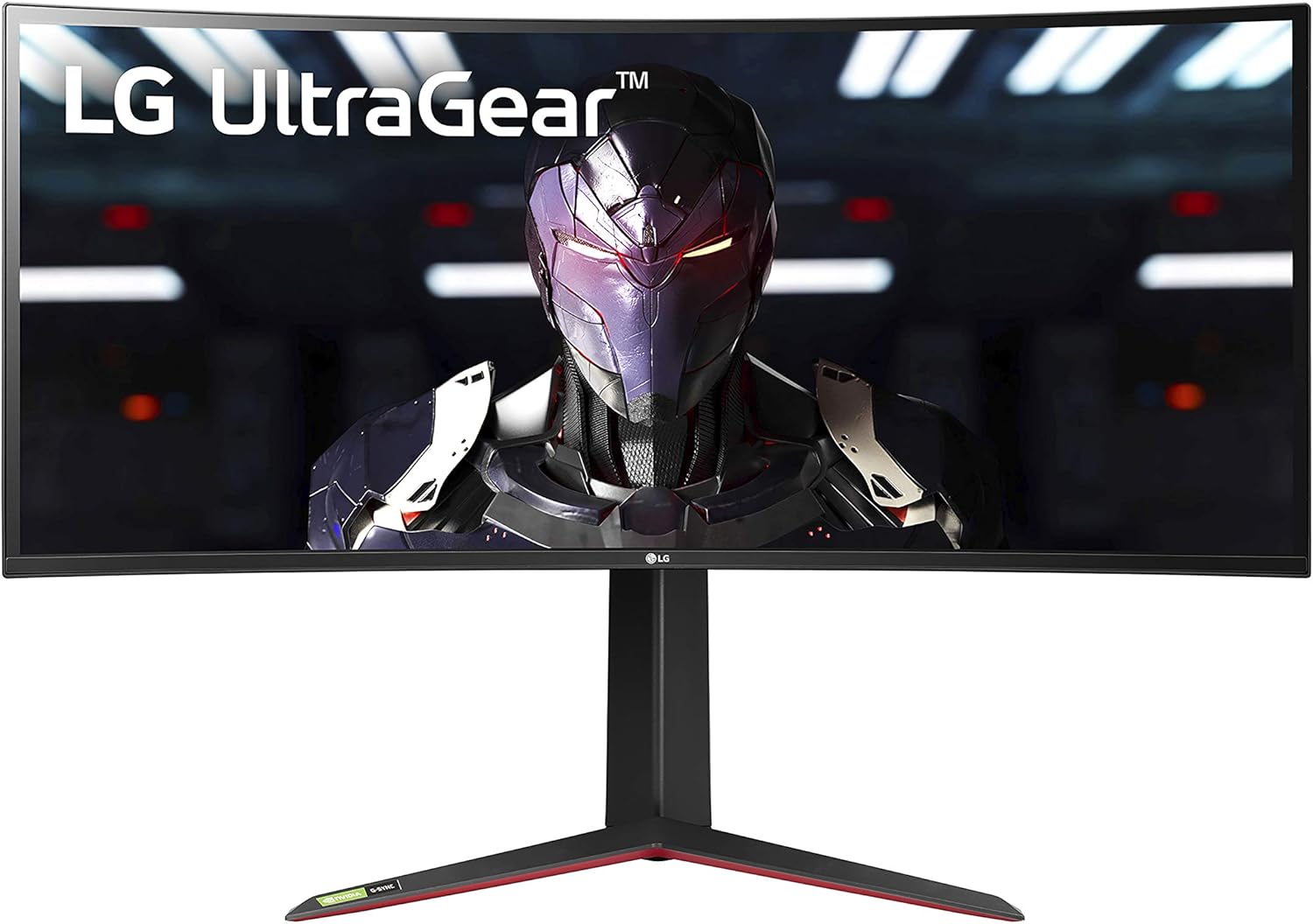
LG 34GP950G-B UltraGear
Best for: Best traditional IPS ultrawide for competitive gamers who want no OLED risk
LG's UltraGear line pioneered the mainstream gaming ultrawide category, and the 34GP950G-B remains a strong option for buyers who prefer IPS over OLED. DisplayHDR 1000 certification delivers real HDR performance — one of the few IPS ultrawides that legitimately impresses in HDR mode. G-Sync Ultimate certification makes it ideal for NVIDIA GPU users.
Why we like it
- DisplayHDR 1000 — real HDR performance
- G-Sync Ultimate certified
- No OLED burn-in risk
- Proven reliability record
Flaws
- Pricier than budget IPS alternatives
- OLEDs have surpassed it in picture quality
- Showing its age compared to 2026 offerings
Prices checked Jun 28, 2026

Gigabyte M34WQ 34" KVM
Best for: Best mid-range ultrawide with built-in KVM for dual-computer setups
The M34WQ packs a KVM switch, USB-C connectivity, and a strong IPS panel into a mid-range price point. For home office users who need to switch between a work laptop and personal PC, the KVM feature alone is worth the premium over basic ultrawides. The 144Hz refresh rate handles gaming well, and Gigabyte's panel calibration is consistently above average for the price.
Why we like it
- Built-in KVM for two-computer switching
- USB-C connectivity with 48W charging
- Solid IPS panel with good color accuracy
- Reasonable price for the feature set
Flaws
- IPS panel can't match OLED for contrast
- USB-C charging only 48W
- Stand could have better height range
Prices checked Jun 28, 2026

LG 34GP83A-B UltraGear
Best for: Best affordable ultrawide monitor for gaming and everyday use
LG's entry-level UltraGear ultrawide hits a sweet spot between price and performance. Nano IPS ensures accurate colors out of the box, and the 160Hz overclock keeps up with competitive gaming. G-Sync Compatible certification works with both NVIDIA and AMD GPUs. If you want to move from a standard 16:9 monitor to ultrawide without breaking the bank, the 34GP83A-B is where we'd start.
Why we like it
- Affordable entry to 34" ultrawide
- 160Hz Nano IPS gaming performance
- Both G-Sync Compatible and FreeSync
- Reliable LG brand with good warranty
Flaws
- No HDR worth mentioning
- IPS glow visible in dark corners
- No USB-C connectivity
Prices checked Jun 28, 2026
Samsung Odyssey G5 34"
Best for: Best ultrawide under $300 for first-time buyers
The Odyssey G5 34" offers the ultrawide experience at the most accessible price point. Samsung's VA panel provides better contrast than IPS at this price tier — blacks are noticeably deeper than comparably priced IPS monitors. The aggressive 1000R curve is very immersive for gaming. First-time ultrawide buyers who want to experience the format without a big investment will love it.
Why we like it
- Most affordable path to UWQHD gaming
- VA panel means better contrast than budget IPS
- 165Hz for smooth gaming
- Aggressive 1000R curve is immersive
Flaws
- VA panel has slower response and smearing
- No USB-C, limited connectivity
- Stand only has tilt adjustment
Prices checked Jun 28, 2026
The Bottom Line
The Alienware AW3423DWF is the best all-around ultrawide for most buyers — outstanding QD-OLED picture for gaming and media. For the ultimate 49" super-ultrawide experience, the Samsung Odyssey G9 G95SD is unmatched. Budget-conscious shoppers should look at the Gigabyte M34WQ or Samsung Odyssey G5 for excellent value.
Best Overall
Alienware AW3423DWF 34" QD-OLED
Our #1 recommendation — the best overall pick in this guide.
Still on the fence? Send a gift card.
Skip the guesswork — a Giftcards.com card lets the recipient pick the exact model they want, delivered instantly.
Looking for more monitors & displays options?
Browse all Monitors & Displays guides →How to Choose the Best Ultrawide Monitors in 2026
BUYING GUIDE
34" vs 38" vs 49" — Which Size Is Right for You?
34" is the sweet spot for most users. It's wide enough to run two windows side-by-side comfortably, fits on most desks, and doesn't require an excessively powerful GPU to drive. The 3440×1440 resolution looks sharp at normal viewing distances.
38" monitors like the LG 38WN95C offer higher resolution (3840×1600) and more screen space, but they cost significantly more and are primarily aimed at creative professionals.
49" super-ultrawides are essentially two 27" 1440p monitors fused together. They're extraordinary for multi-tasking and trading setups, but require a very large desk, a powerful GPU, and a serious investment.
Best Overall
Alienware AW3423DWF 34" QD-OLED
A great example of this in practice — check current price on Amazon.
OLED vs IPS vs VA for Ultrawides
OLED (including QD-OLED) delivers the best picture quality: perfect blacks, vibrant colors, and near-instant response times. The risk of burn-in is real but manageable with normal use. QD-OLED is currently available in 34" and 49" ultra-wide formats.
IPS panels offer consistent colors and good viewing angles with no burn-in risk. IPS Black panels (like Dell's UltraSharp) bring near-OLED contrast ratios to IPS technology.
VA panels have the best contrast ratio of traditional panel types — significantly better blacks than standard IPS. The trade-off is slower pixel response and smearing in dark gaming scenes. Good for mixed gaming/productivity use at budget price points.
FAQ
COMMON QUESTIONS
Head-to-Head Comparisons
COMPARE TOP PICKS SIDE BY SIDE
Alienware AW3423DWF 34" QD-OLED vs Samsung Odyssey G9 49" G95SD
9.4/10 vs 9.3/10 — Close call
Alienware AW3423DWF 34" QD-OLED vs ASUS ROG Swift OLED PG34WCDM
9.4/10 vs 9.2/10 — Close call
Samsung Odyssey G9 49" G95SD vs ASUS ROG Swift OLED PG34WCDM
9.3/10 vs 9.2/10 — Close call
Browse More Guides
RELATED GUIDES

Related Articles
FROM OUR EDITORIAL TEAM

Low Vision Monitors: Display Settings and Hardware for Maximum Visibility
The right monitor and display settings can make computing comfortable for people with low vision. We cover screen size, resolution, color settings, and specialized displays.

Guide: OLED vs Mini-LED Monitors: Which Display Is Better in 2026 (This Week)
Guide: OLED vs Mini-LED Monitors: Which Display Is Better in 2026 (This Week) — expert analysis and tested recommendations from BestElectronicsReviewed.

Why Ultrawide Monitors Are Better Than Dual Monitors
Two monitors or one ultrawide? After testing both setups extensively, the ultrawide wins for most people. Here's the detailed case.