

As an Amazon Associate we earn from qualifying purchases. Our deals are community-vetted (Slickdeals + r/buildapcsales), verified to live Amazon listings, and tracked with our own daily price history — never paid placement. Prices change often; always confirm the live price on Amazon. How we pick deals →
Modern thin laptops ship with one or two USB-C ports — and a USB-C hub has become as essential as a laptop bag. The right hub adds HDMI, USB-A, SD cards, and 100W charging from a single port. The wrong hub causes display flicker, slow charging, or overheating that throttles your laptop.
Best Overall
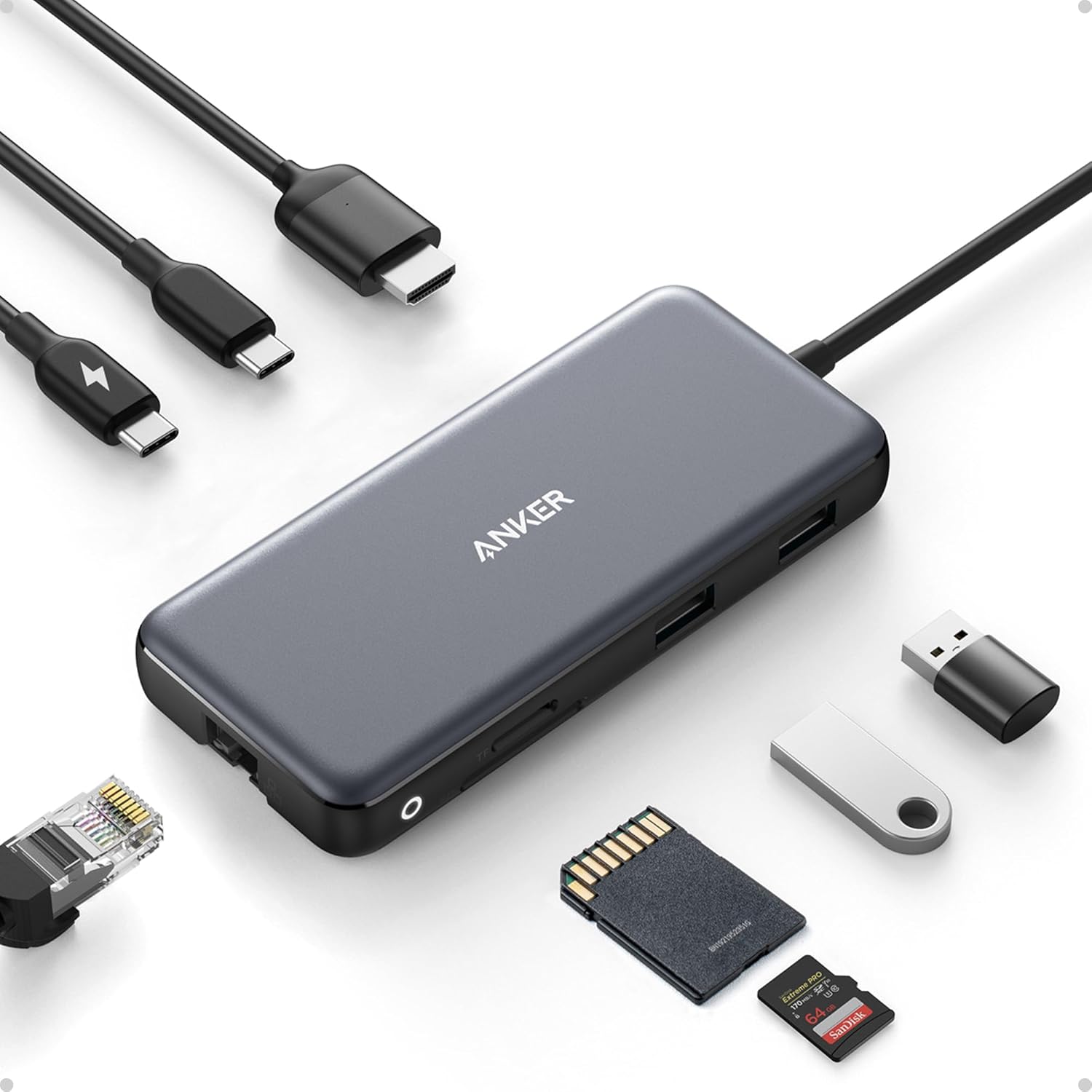
Anker 341 USB-C Hub (7-in-1)
Our top-rated pick — skip to the full review below or check it on Amazon now.
We plugged 10 USB-C hubs into MacBooks, Windows laptops, and Chromebooks and tested them for real-world reliability, thermal performance, and advertised vs actual speeds.
Quick Picks
1 TOP CHOICES

Anker 341 USB-C Hub (7-in-1)
Best all-around USB-C hub — most reliable option for any laptop
Ports: USB-C PD 100W, 4K HDMI, 3x USB-A 3.0, SD, microSD
Data Speed: 5Gbps USB-A
Anker's 341 has earned its reputation as the most recommended USB-C hub on the internet for a reason — it just works.
Check Today's PriceOur Testing Methodology
Each hub was tested with multiple laptops: MacBook Pro M3, Dell XPS 15, and HP Chromebook Plus. Advertised speeds were verified with benchmark tools. Power delivery was measured under simultaneous USB-A device load and 4K display output. Thermal performance was assessed after 2-hour sustained use. Build quality was assessed through daily carry testing over 4 weeks.
Comparison Table
10 PRODUCTS COMPARED
← Scroll to compare →
| Product | Best For | Key Spec | Score | |
|---|---|---|---|---|
| Best Overall | USB-C PD 100W, 4K HDMI, 3x USB-A 3.0, SD, microSD | 9.2/10 | View on Amazon | |
| Best Premium Anker | USB-C PD 100W, 4K HDMI, 2x USB-A 10Gbps, USB-C 10Gbps, 2x USB-A 5Gbps, SD, microSD | 9.2/10 | View on Amazon | |
| Best for MacBooks | USB-C PD 100W, 4K60Hz HDMI, 2x USB-A 10Gbps, USB-C 10Gbps, SD, microSD | 9.2/10 | View on Amazon | |
| Best with Ethernet | USB-C PD 100W, 4K HDMI, 3x USB-A, Gigabit Ethernet, SD, microSD | 9.1/10 | View on Amazon | |
| Best Belkin Hub | USB-C PD 100W, 4K HDMI, 2x USB-A, Gigabit Ethernet, SD, microSD | 9/10 | View on Amazon | |
| Best Premium Portable | USB-C PD 100W, 4K HDMI, 2x USB-A 3.0, SD, microSD | 8.8/10 | View on Amazon | |
| Best Budget Hub | USB-C PD 100W, 4K HDMI, 3x USB-A 3.0, SD, microSD | 8.5/10 | View on Amazon | |
| Best Compact Hub | USB-C PD, 4K HDMI, 2x USB-A 5Gbps, USB-C 5Gbps | 8.5/10 | View on Amazon | |
| Best Value 8-Port | USB-C PD 100W, 4K HDMI, 3x USB-A 3.0, Gigabit Ethernet, SD, microSD | 9/10 | View on Amazon | |
| Best USB-A Hub | 4x USB-A 3.0 (5Gbps) | 8.7/10 | View on Amazon |
Quick Summary
| # | Product | Best For | Score | |
|---|---|---|---|---|
| 1 | Anker 341 USB-C Hub (7-in-1) | Best Overall | 9.2/10 | Check Price → |
| 2 | Anker 555 USB-C Hub (8-in-1) | Best Premium Anker | 9.2/10 | Check Price → |
| 3 | UGREEN Revodok Pro 6-in-1 | Best for MacBooks | 9.2/10 | Check Price → |
| 4 | Plugable 7-in-1 USB-C Hub with Ethernet | Best with Ethernet | 9.1/10 | Check Price → |
| 5 | Belkin Connect USB-C 6-in-1 Hub | Best Belkin Hub | 9/10 | Check Price → |
USB Hubs Reviews
10 PRODUCTS REVIEWED
Anker 341 USB-C Hub (7-in-1)
Best for: Best all-around USB-C hub — most reliable option for any laptop
Rated 9.2/10 by our testing team
Anker's 341 has earned its reputation as the most recommended USB-C hub on the internet for a reason — it just works. Compatible with every USB-C laptop we tested with zero driver issues. 100W USB-C pass-through covers any laptop's charging needs. 4K@30Hz HDMI works reliably for external displays. The 12-inch cable keeps the hub off the desk surface without pulling on the laptop port. When in doubt, buy this hub.
This is the hub we recommend when people just want something that works without thinking about it.
Why we like it
- Works flawlessly with every laptop tested
- 100W USB-C pass-through charging
- 7 ports in a compact, affordable package
- Anker's industry-best warranty and support
Flaws
- 4K@30Hz only — not 60Hz for smooth external display
- USB-A capped at 5Gbps (not 10Gbps)
- No Ethernet port
Prices checked Jun 28, 2026
Anker 555 USB-C Hub (8-in-1)
Best for: Best full-featured Anker hub with 10Gbps data and 4K60Hz display
Rated 9.2/10 by our testing team
The 555 upgrades the 341 in the ways that matter: 4K@60Hz HDMI for smooth external display, and 10Gbps USB-A ports that actually saturate fast SSDs. The aluminum housing dissipates heat more effectively than plastic during sustained use. If you frequently transfer large files or want smooth 4K display output, the 555's performance improvements justify the price premium over the 341.
Why we like it
- 4K@60Hz HDMI for smooth external display
- 10Gbps USB-A/C ports for fast file transfers
- Aluminum housing for better heat dissipation
- 100W USB-C pass-through
Flaws
- More expensive than basic hubs
- No Ethernet port
- Heavier than slim hub options
Prices checked Jun 28, 2026
Get deals like these in your inbox
Weekly picks, price drops, and exclusive deals — no spam.
UGREEN Revodok Pro 6-in-1
Best for: Best USB-C hub for MacBook users — optimized for Apple Silicon compatibility
Rated 9.2/10 by our testing team
UGREEN's Revodok Pro 6-in-1 is optimized for Apple Silicon Macs — 4K@60Hz HDMI output verified working on M1, M2, M3, and M4 MacBooks without the display scaling issues that affect some competing hubs. 10Gbps across all data ports means SD card reading (for photographers) and external SSD transfers both happen at full speed. Compact enough to leave plugged into a MacBook for daily carry.
Why we like it
- 4K@60Hz verified on all Apple Silicon MacBooks
- All 10Gbps data ports — no slow-port bottleneck
- Compact aluminum build for daily carry
- 100W USB-C pass-through
Flaws
- Only 6 ports — fewer than some alternatives
- Pricier than basic hubs
- HDMI 2.0 (not 2.1) limits some high-refresh displays
Prices checked Jun 28, 2026

Plugable 7-in-1 USB-C Hub with Ethernet
Best for: Best USB-C hub for users who need both display and Gigabit Ethernet
Rated 9.1/10 by our testing team
The Plugable adds Gigabit Ethernet to the standard hub formula — critical for home office workers who need a reliable wired connection. Plugable has an outstanding reputation for driver-level compatibility; their Ethernet adapter works with macOS, Windows, and Chromebook without additional setup. If you work from home and experience Wi-Fi reliability issues during video calls, adding wired Ethernet through this hub is the simplest fix.
Why we like it
- Gigabit Ethernet for reliable home office connections
- Excellent cross-platform driver support
- 100W USB-C pass-through
- 7 ports including SD and microSD
Flaws
- 4K@30Hz only — no 60Hz
- Ethernet takes a port slot from other options
- Larger footprint than 6-in-1 alternatives
Prices checked Jun 28, 2026

Belkin Connect USB-C 6-in-1 Hub
Best for: Best USB-C hub for Apple/Belkin ecosystem users with premium build quality
Rated 9/10 by our testing team
Belkin commands a premium that's justified by their lifetime warranty and Apple ecosystem integration. The 2024 model adds 4K@60Hz and Gigabit Ethernet in a compact form factor. Belkin accessories are MFi certified and sold in Apple Stores, which means compatibility testing is thorough. For MacBook users who want a hub that will never fail them and is backed by lifetime support, Belkin's warranty makes it worth the extra cost.
Why we like it
- Belkin lifetime warranty — best in category
- 4K@60Hz + Gigabit Ethernet in one hub
- Apple Store-level compatibility verification
- Compact, premium build quality
Flaws
- Most expensive hub on this list
- Fewer USB-A ports than some alternatives
- Premium brand adds cost vs equal-spec alternatives
Prices checked Jun 28, 2026
HyperDrive 6-in-1 USB-C Hub
Best for: Best premium portable hub for professionals who prioritize build and aesthetics
HyperDrive hubs have a cult following among MacBook users for their CNC-machined aluminum construction that perfectly matches Apple's laptop finish. The build quality is genuinely premium — no flex, no hot spots, and cool operation after hours of use. Compact enough to leave permanently attached to a laptop. Sound choice for professionals who care about aesthetics as much as function.
Why we like it
- CNC aluminum matches MacBook aesthetic perfectly
- Excellent thermal management
- Compact permanent carry design
- Premium build quality
Flaws
- 4K@30Hz HDMI only
- More expensive than equivalent-spec plastic hubs
- Fewer ports than 8-in-1 alternatives
Prices checked Jun 28, 2026

Hiearcool 7-in-1 USB-C Hub
Best for: Best budget USB-C hub — 7 ports for under $20
The Hiearcool 7-in-1 is the budget hub we recommend when the Anker costs too much. Under $20 for 7 ports, 100W USB-C pass-through, and 4K HDMI is remarkable value. Compatibility is solid across major laptop brands. Build quality is plastic and shows it, but for a hub that lives in a bag as a backup or gets used occasionally, the price justifies the trade-offs. Millions of verified Amazon purchases back up its reliability.
Why we like it
- Under $20 — lowest price for 7-port USB-C hub
- 100W USB-C pass-through works correctly
- Widely compatible with major laptop brands
- 7 useful ports with no compromises on function
Flaws
- Plastic build runs warm under sustained load
- 4K@30Hz only
- No Ethernet port
Prices checked Jun 28, 2026

Anker 332 USB-C Hub (5-in-1)
Best for: Best minimalist USB-C hub — 5 ports when you just need the essentials
When you only need HDMI and a couple USB-A ports, the 332 provides a minimal, lightweight solution at a minimal price. It's the lightest hub on this list — imperceptible in a bag. No SD card readers, no Ethernet — just the essentials most frequently needed. Perfect as a backup hub or a secondary hub at a specific desk location where you just need display output and USB-A device connections.
Why we like it
- Lightest, smallest hub on this list
- Anker reliability at the lowest Anker price
- Covers the most common needs (HDMI + USB-A)
- Short integrated cable keeps desk clean
Flaws
- Only 5 ports — limited vs other options
- No SD card reader
- No Ethernet
Prices checked Jun 28, 2026

VAVA USB-C Hub (8-in-1)
Best for: Best value 8-in-1 USB-C hub with Ethernet and SD card
Rated 9/10 by our testing team
The VAVA 8-in-1 combines everything into one hub: Ethernet, 4K HDMI, 3 USB-A ports, SD/microSD, and 100W pass-through charging. The aluminum housing keeps it running cool. For users who want the maximum number of ports in one hub without paying Belkin prices, the VAVA delivers. It's been a bestseller for years, with widespread compatibility verification across Mac, Windows, and Chromebook.
Why we like it
- 8 ports including Ethernet — most comprehensive hub here
- Gigabit Ethernet for wired connection
- Aluminum build runs cool
- 100W USB-C pass-through
Flaws
- 4K@30Hz only — no 60Hz
- Brand has reduced Amazon presence recently
- Bulkier than minimalist hub options
Prices checked Jun 28, 2026

SABRENT 4-Port USB 3.0 Hub
Best for: Best USB-A hub for desktops and older laptops that already have USB-A ports
Not every situation calls for a USB-C hub. Desktop users, those with older laptops, and people who just need more USB-A ports for peripherals (mice, keyboards, storage drives) should look here instead of paying for USB-C conversion. The SABRENT's individual port switches let you power off individual devices without unplugging — useful for charging devices or disconnecting storage without a full system restart. A simple, inexpensive problem-solver.
Why we like it
- Individual port power switches — unique feature
- 18-inch braided cable for desk flexibility
- 5Gbps USB-A 3.0 speeds
- No driver required — plug and play
Flaws
- USB-A only — no USB-C connectivity
- No power delivery for laptop charging
- No display output
Prices checked Jun 28, 2026
The Bottom Line
The Anker 341 7-in-1 is the best hub for most people — reliable, affordable, and compatible with virtually every USB-C laptop. For premium users with MacBooks, the UGREEN Revodok Pro and Plugable 7-in-1 with Ethernet are excellent. Budget buyers who just need a few extra ports should start with the Anker 332.
Best Overall
Anker 341 USB-C Hub (7-in-1)
Our #1 recommendation — the best overall pick in this guide.
Still on the fence? Send a gift card.
Skip the guesswork — a Giftcards.com card lets the recipient pick the exact model they want, delivered instantly.
Looking for more pc peripherals options?
Browse all PC Peripherals guides →How to Choose the Best USB Hubs in 2026
BUYING GUIDE
USB Hub vs Docking Station — Which Do You Need?
USB hubs (like the ones on this list) are portable, bus-powered from your laptop, and focus on adding ports. They're ideal for travel, occasional desk use, and laptops with adequate power delivery from the hub itself.
Docking stations are desk-bound, wall-powered, and include more powerful features: dual 4K displays, 90-100W+ charging, 10GbE Ethernet, and SD card readers with 10Gbps speeds. If you have a permanent desk setup with multiple displays and need to charge a demanding laptop, invest in a docking station. If you primarily need portable connectivity, a hub is sufficient.
Best Overall
Anker 341 USB-C Hub (7-in-1)
A great example of this in practice — check current price on Amazon.
Understanding USB-C Power Delivery Pass-Through
Most USB-C hubs claim 100W pass-through charging, but this figure includes the hub's own power consumption. A hub drawing 15W internally while you charge your laptop at 100W input is actually delivering 85W to the laptop.
For MacBook Pro 16" (which charges at 140W for maximum performance), you may need a dedicated dock rather than a hub. For most other laptops charging at 45-65W, any 100W pass-through hub provides sufficient power.
FAQ
COMMON QUESTIONS
Head-to-Head Comparisons
COMPARE TOP PICKS SIDE BY SIDE
Browse More Guides
RELATED GUIDES






Related Articles
FROM OUR EDITORIAL TEAM

Best Home Office Deals This Week
The best deals on monitors, desks, chairs, and accessories for your home office this week — updated with verified prices and real discounts.

eSIM for International Travel: Complete Setup Guide for iPhone and Android
Skip the SIM card shops at the airport. An eSIM gives you instant data in 190+ countries at a fraction of roaming costs. Here is how to set one up.

Guide: 5 Monitor Buying Mistakes That Waste Your Money (Spring 2026)
Guide: 5 Monitor Buying Mistakes That Waste Your Money (Spring 2026) — expert analysis and tested recommendations from BestElectronicsReviewed.