

As an Amazon Associate we earn from qualifying purchases. Our deals are community-vetted (Slickdeals + r/buildapcsales), verified to live Amazon listings, and tracked with our own daily price history — never paid placement. Prices change often; always confirm the live price on Amazon. How we pick deals →
Chromebooks have evolved far beyond the cheap web-browsing computers they once were. Chromebook Plus models from ASUS, Acer, HP, and Lenovo now offer 12th/13th Gen Intel processors, 2K displays, and AI-powered Google features. Chrome OS supports Android apps, Linux apps, and cloud gaming — making modern Chromebooks capable of tasks that once required full Windows laptops.
Best Overall
ASUS Chromebook Plus CX34
Our top-rated pick — skip to the full review below or check it on Amazon now.
We tested 10 Chromebooks for real-world productivity, streaming, and Google Workspace use to find the best for every type of user.
Quick Picks
1 TOP CHOICES

ASUS Chromebook Plus CX34
Best all-around Chromebook Plus — ideal for students, home users, and remote workers
CPU: Intel Core i3-1215U
RAM: 8GB LPDDR4x
The ASUS Chromebook Plus CX34 hits the sweet spot of Chromebook Plus performance and value.
Check Today's PriceOur Testing Methodology
Each Chromebook was used as a primary computer for at least two weeks. Performance was measured with Speedometer browser benchmark and real-world web app loading times. Battery life was measured with display at 200 nits brightness during continuous web browsing. Build quality was assessed through daily use and keyboard/trackpad quality evaluation. Google ecosystem integration was scored based on seamlessness.
Comparison Table
9 PRODUCTS COMPARED
← Scroll to compare →
| Product | Best For | Key Spec | Score | |
|---|---|---|---|---|
| Best Overall | Intel Core i3-1215U | 9.2/10 | View on Amazon | |
| Best Premium Chromebook | Intel Core i7-1355U | 9.3/10 | View on Amazon | |
| Best for Cloud Gaming | 16" WQXGA (2560×1600) 120Hz IPS | 9.2/10 | View on Amazon | |
| Best 2-in-1 Chromebook | Intel Core i3-1315U | 9/10 | View on Amazon | |
| Best Large-Screen Chromebook | 16" FHD+ IPS Touch 360° | 8.9/10 | View on Amazon | |
| Best Samsung Chromebook | Intel Celeron / Core i3 | 8.5/10 | View on Amazon | |
| Best Budget 15" Chromebook | Intel N200 (quad-core) | 8/10 | View on Amazon | |
| Best Detachable Chromebook | 13.3" OLED (2560×1600) touch | 8.5/10 | View on Amazon | |
| Best 2-in-1 Tablet Chromebook | MediaTek Kompanio 828 | 8.4/10 | View on Amazon |

Quick Summary
| # | Product | Best For | Score | |
|---|---|---|---|---|
| 1 | ASUS Chromebook Plus CX34 | Best Overall | 9.2/10 | Check Price → |
| 2 | Acer Chromebook Spin 714 (2024) | Best Premium Chromebook | 9.3/10 | Check Price → |
| 3 | Acer Chromebook Plus 516 GE | Best for Cloud Gaming | 9.2/10 | Check Price → |
| 4 | Lenovo IdeaPad Flex 5i Chromebook Plus | Best 2-in-1 Chromebook | 9/10 | Check Price → |
| 5 | ASUS Chromebook Plus Flip CX5 16" | Best Large-Screen Chromebook | 8.9/10 | Check Price → |
Chromebooks Reviews
9 PRODUCTS REVIEWED
ASUS Chromebook Plus CX34
Best for: Best all-around Chromebook Plus — ideal for students, home users, and remote workers
Rated 9.2/10 by our testing team
The ASUS Chromebook Plus CX34 hits the sweet spot of Chromebook Plus performance and value. The Core i3-1215U handles multiple Chrome tabs, Google Meet, and Android apps without the sluggishness of entry-level Chromebooks. Chromebook Plus features include Magic Eraser, Photo Unblur, and Video Call Background Blur running locally on device. The 14" IPS display is bright enough for outdoor use. Reliable all-day battery makes it an excellent work and school companion.
The best entry point into the Chromebook Plus tier. Noticeably faster and more capable than older Celeron-based Chromebooks.
Why we like it
- Chromebook Plus features and AI capabilities
- Core i3 handles demanding web apps smoothly
- 256GB SSD — good local storage for a Chromebook
- AI Google Meet enhancements work great
Flaws
- No touchscreen in base model
- IPS display not as vibrant as OLED alternatives
- Fan noise under sustained load
Prices checked Jun 28, 2026
Acer Chromebook Spin 714 (2024)
Best for: Best premium Chromebook for power users — QHD touch display and Core i7
Rated 9.3/10 by our testing team
The Spin 714 2024 is the Chromebook for users who want the best. A QHD 2560×1600 touchscreen makes text and images noticeably sharper than 1080p displays. Core i7-1355U handles demanding workloads including web-based video editing and complex spreadsheets. Thunderbolt 4 adds USB4 connectivity for external displays and docks. This is the Chromebook that competes with budget Windows laptops on raw capability.
Why we like it
- QHD 2560×1600 display noticeably sharper
- Core i7 for demanding Chrome OS workloads
- Thunderbolt 4 connectivity
- 2-in-1 versatility with touch and stylus
Flaws
- Most expensive Chromebook here
- Chrome OS still limited vs full Windows
- 8GB RAM shared with all apps
Prices checked Jun 28, 2026
Get deals like these in your inbox
Weekly picks, price drops, and exclusive deals — no spam.

Acer Chromebook Plus 516 GE
Best for: Best Chromebook for GeForce NOW and Xbox Cloud Gaming
Rated 9.2/10 by our testing team
Acer built the Chromebook 516 GE specifically for cloud gaming. The 120Hz display makes GeForce NOW games look and feel substantially smoother than 60Hz competitors — the difference is immediately obvious in fast-paced games. WQXGA (2560×1600) resolution provides sharper game visuals. Built-in Ethernet (RJ45) eliminates Wi-Fi latency for competitive cloud gaming. If you game via Xbox Cloud or GeForce NOW, this is the Chromebook to buy.
Why we like it
- 120Hz display is a major gaming advantage
- Built-in Ethernet for cloud gaming latency reduction
- WQXGA resolution for sharper game visuals
- Wi-Fi 6E for wireless gaming option
Flaws
- Heavy and large for a Chromebook
- 8GB RAM tight for demanding Android apps alongside gaming
- Cloud gaming requires good internet — poor offline use
Prices checked Jun 28, 2026

Lenovo IdeaPad Flex 5i Chromebook Plus
Best for: Best convertible Chromebook Plus — touchscreen flexibility with solid performance
Rated 9/10 by our testing team
Lenovo's 2-in-1 Flex 5i offers the full Chromebook Plus feature set in a versatile convertible form factor. The 360-degree hinge lets you use it as a tablet, tent, or traditional laptop. The included USI 2.0 stylus stores inside the laptop and supports Google Workspace apps. The FHD+ resolution provides slightly more vertical space than standard FHD — noticeable in document and spreadsheet work.
Why we like it
- 360° convertible versatility for any workflow
- Included USI 2.0 stylus stored internally
- FHD+ provides extra vertical screen space
- Core i3-1315U handles Chromebook Plus AI features
Flaws
- Heavier than non-convertible alternatives
- Hinge adds thickness and weight
- FHD+ not as sharp as QHD displays
Prices checked Jun 28, 2026

ASUS Chromebook Plus Flip CX5 16"
Best for: Best Chromebook for users who want a large 16" screen
ASUS's 16" Flip CX5 is the answer for users who find standard 14" Chromebooks cramped. The larger display makes multi-tab browsing and Google Workspace documents significantly more comfortable. As a 2-in-1, it converts to a large drawing tablet for annotating documents with the stylus. For home users who work primarily at a desk and want a large screen without a desktop computer, this is the pick.
Why we like it
- 16" display — most screen space in Chromebook category
- 2-in-1 versatility at 16" size
- Chromebook Plus AI features
- Core i3-1215U handles demanding apps
Flaws
- Heavy for a 16" laptop category
- 16" is less portable for daily commuting
- No 2K display at this size
Prices checked Jun 28, 2026

Samsung Galaxy Chromebook Go 14"
Best for: Best Samsung Chromebook for Galaxy ecosystem integration
Samsung's Chromebook Go delivers the best Samsung Galaxy integration available in a Chromebook. Samsung DeX support means you can connect a monitor and use the Chromebook as a full desktop environment. Phone Link lets you see Galaxy phone notifications and even mirror your phone screen on the Chromebook. For households heavy in Samsung devices — Galaxy phone, Galaxy tablet — the ecosystem integration is genuinely valuable.
Why we like it
- Samsung Galaxy ecosystem integration
- Samsung DeX support for desktop mode
- Phone Link for Galaxy smartphone connectivity
- 14" size balances portability and usability
Flaws
- Less powerful processor than Chromebook Plus rivals
- No Chromebook Plus AI features
- Ecosystem benefits lost on non-Samsung phone users
Prices checked Jun 28, 2026

HP Chromebook 15a
Best for: Best budget 15" Chromebook for students who want screen space at low cost
For students who need a large screen at the lowest possible price, the HP Chromebook 15a is the right choice. The 15.6" display gives meaningful extra screen space for documents and web research. Intel N200 provides a significant step up from the Celeron N4000 in older Chromebooks. DDR5 RAM at this price is unusual. The 64GB eMMC storage is the main limitation — cloud storage (Google Drive) needs to supplement local storage.
Why we like it
- 15.6" screen at budget price
- DDR5 RAM at budget tier
- Intel N200 noticeably faster than old Celeron
- HP build quality even at budget
Flaws
- 64GB eMMC storage requires Google Drive use
- HD (not FHD) display
- No Chromebook Plus features
Prices checked Jun 28, 2026

Lenovo IdeaPad Duet 5 Chromebook
Best for: Best Chromebook tablet — OLED display in a detachable laptop/tablet form
The Duet 5's OLED display is its killer feature — the vibrant colors and deep blacks of an OLED panel on a Chromebook at this price is genuinely impressive. The detachable keyboard makes it as usable as a tablet as a laptop. Battery life is exceptional given the efficient Snapdragon processor. Trade-off: 4GB RAM limits heavy multitasking. Best for users who want a portable reading, streaming, and light productivity device with an exceptional screen.
Why we like it
- OLED display with vivid colors and deep blacks
- Detachable keyboard for tablet flexibility
- Exceptional battery life
- OLED makes streaming content stunning
Flaws
- 4GB RAM limits multitasking
- Snapdragon processor can be slow on complex web apps
- Keyboard cover sold separately or included depending on listing
Prices checked Jun 28, 2026
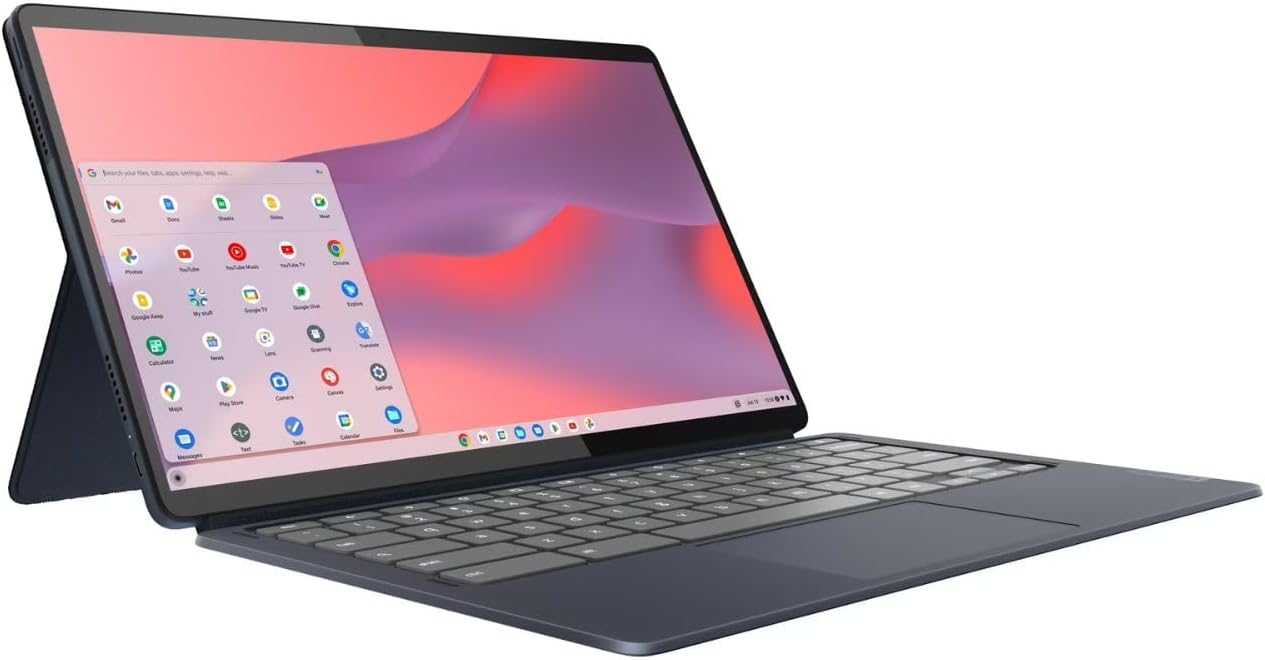
Lenovo Chromebook Duet Gen 9
Best for: Latest detachable Chromebook with modern MediaTek chipset and improved performance
The Duet Gen 9 is Lenovo's latest compact detachable Chromebook — comes with both a keyboard cover and USI pen for handwriting and annotation. MediaTek Kompanio 828 improves on older Snapdragon-based Chromebook tablets with better Chrome OS optimization. At 10.95", it's the most portable Chromebook on this list — genuinely pocketable in a large bag or purse. Ideal as a secondary device or for students who need light, mobile computing.
Why we like it
- Keyboard + USI pen included in box
- Most portable Chromebook on this list
- Good MediaTek performance for Chrome OS
- Long battery life from efficient SoC
Flaws
- 10.95" is small for productivity work
- 4GB RAM limits Android app multitasking
- FHD display (not 2K like the Duet 5)
Prices checked Jun 28, 2026
The Bottom Line
The ASUS Chromebook Plus CX34 is our top pick for most users — strong Intel Core i3 performance, Chromebook Plus features, and excellent value. The Acer Chromebook Spin 714 is the premium choice for power users. Students on a budget should consider the HP Chromebook 15a for the most screen space per dollar.
Best Overall
ASUS Chromebook Plus CX34
Our #1 recommendation — the best overall pick in this guide.
Still on the fence? Send a gift card.
Skip the guesswork — a Giftcards.com card lets the recipient pick the exact model they want, delivered instantly.
Looking for more laptops & ultrabooks options?
Browse all Laptops & Ultrabooks guides →How to Choose the Best Chromebooks in 2026
BUYING GUIDE
Chromebook Plus vs Standard Chromebook
Google introduced Chromebook Plus in 2023 as a minimum spec tier: at least 8GB RAM, 128GB storage, Core i3 (or equivalent), Full HD+ display, and access to Google AI features like Photo Unblur, Magic Eraser, and Video Call Background Blur. Chromebook Plus models start around $350-400 and up.
Standard Chromebooks below the Plus tier run Chrome OS fine for basic tasks but may feel slow with many tabs open and miss the AI features. For 2026, we recommend buying a Chromebook Plus model if your budget allows.
Best Overall
ASUS Chromebook Plus CX34
A great example of this in practice — check current price on Amazon.
Chrome OS vs Windows for Laptop Buyers
Chrome OS is excellent for Google Workspace users, students, and anyone whose entire workflow lives in a browser. Gmail, Google Docs, Sheets, Meet, YouTube, and Netflix are all first-class on Chrome OS.
Where Chrome OS still falls short: professional-grade software (Adobe Premiere, Photoshop at full capability, AutoCAD), Windows-only business applications, and PC gaming. Android app support is good but not every app works perfectly on a laptop screen. If you need Windows software, buy a Windows laptop.
FAQ
COMMON QUESTIONS
Head-to-Head Comparisons
COMPARE TOP PICKS SIDE BY SIDE
Browse More Guides
RELATED GUIDES





Related Articles
FROM OUR EDITORIAL TEAM

MacBook Air M5 vs Dell XPS 14: Ultrabook Showdown
Apple's latest Air against Dell's premium ultrabook. We compared performance, display, battery life, and daily usability for professionals and students.
Chromebook vs Windows Laptop: Which Is Right for You?
Chromebooks cost less and boot faster. Windows laptops do more. Here's the honest comparison that helps you pick the right platform for your needs.
MacBook Air vs Dell XPS 13: Best Ultrabook in 2026
The two best ultrabooks go head to head. We compare the M4 MacBook Air and Dell XPS 13 on performance, battery life, display, and value to help you pick the right one.