

As an Amazon Associate we earn from qualifying purchases. Our deals are community-vetted (Slickdeals + r/buildapcsales), verified to live Amazon listings, and tracked with our own daily price history — never paid placement. Prices change often; always confirm the live price on Amazon. How we pick deals →
Quick Picks
1 TOP CHOICES
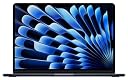
Apple MacBook Air 13" M3
Most users — students, professionals, and everyday users who want the best all-around laptop
Chip: Apple M3 (8-core CPU, 10-core GPU)
Display: 13.6" Liquid Retina
The MacBook Air M3 is the laptop we recommend to almost everyone.
Check Today's PriceComparison Table
4 PRODUCTS COMPARED
← Scroll to compare →
| Product | Best For | Key Spec | Score | |
|---|---|---|---|---|
| Best Overall | Apple M3 (8-core CPU, 10-core GPU) | 9.3/10 | View on Amazon | |
| Best for Professionals | Apple M3 Pro (11-core CPU, 14-core GPU) | 9/10 | View on Amazon | |
| Best Large Screen | Apple M2 Pro (12-core CPU, 19-core GPU) | 8.8/10 | View on Amazon | |
| Best Budget Mac | Apple M1 (8-core CPU, 7-core GPU) | 8.5/10 | View on Amazon |
Quick Summary
| # | Product | Best For | Score | |
|---|---|---|---|---|
| 1 | Apple MacBook Air 13" M3 | Best Overall | 9.3/10 | Check Price → |
| 2 | Apple MacBook Pro 14" M3 | Best for Professionals | 9/10 | Check Price → |
| 3 | Apple MacBook Pro 16" M2 Pro | Best Large Screen | 8.8/10 | Check Price → |
| 4 | Apple MacBook Air M1 (2020) | Best Budget Mac | 8.5/10 | Check Price → |
MacBook Laptops Reviews
4 PRODUCTS REVIEWED
Apple MacBook Air 13" M3
Best for: Most users — students, professionals, and everyday users who want the best all-around laptop
Rated 9.3/10 by our testing team
The MacBook Air M3 is the laptop we recommend to almost everyone. The M3 chip handles everything from web browsing and coding to photo editing and light video work without the fan ever spinning — because there is no fan. 18-hour battery lasts a full workday and then some. At just 2.7 lbs, it's incredibly portable. The Liquid Retina display is sharp and color-accurate. If you need a laptop that just works, this is it.
Why we like it
- Fanless — completely silent always
- 18-hour battery — all-day and then some
- M3 chip handles 90% of workflows
Flaws
- Only 8GB unified memory on base model
- Single external display support
- 13.6" may feel small for some
Prices checked Jun 28, 2026
Apple MacBook Pro 14" M3
Best for: Software developers, video editors, and creative professionals who need sustained performance
Rated 9/10 by our testing team
The MacBook Pro 14 M3 is for users who hit the Air's limits. The Liquid Retina XDR display with ProMotion 120Hz is noticeably smoother and brighter than the Air's screen — HDR content looks stunning. The M3 Pro chip sustains heavy workloads without throttling thanks to the active cooling system. Three Thunderbolt ports, HDMI, SD card reader, and MagSafe charging cover every connectivity need. For professional work, the Pro is worth the premium.
Why we like it
- XDR display with 120Hz ProMotion
- M3 Pro sustains heavy workloads
- 3x Thunderbolt + HDMI + SD card reader
Flaws
- Heavier at 3.4 lbs vs Air's 2.7 lbs
- $1,599+ starting price
- Fan noise under heavy sustained load
Prices checked Jun 28, 2026
Get deals like these in your inbox
Weekly picks, price drops, and exclusive deals — no spam.

Apple MacBook Pro 16" M2 Pro
Best for: Video editors and power users who need maximum screen real estate and sustained heavy performance
The 16-inch MacBook Pro is the desktop replacement. The massive 16.2-inch XDR display gives you enough room to edit 4K timelines with multiple panels open. The M2 Pro chip with 19 GPU cores handles Final Cut Pro, DaVinci Resolve, and Logic Pro without breaking a sweat. 22-hour battery life is the longest of any MacBook. Six-speaker system with spatial audio is surprisingly immersive. For professionals who need a big screen on the go, nothing competes.
Why we like it
- 22-hour battery — longest MacBook ever
- 16.2" XDR display is a desktop replacement
- Six-speaker spatial audio system
Flaws
- Heavy at 4.7 lbs — not ultraportable
- Expensive — starts at $2,499
- M2 Pro is previous gen (M3 Pro available in 14")
Prices checked Jun 28, 2026

Apple MacBook Air M1 (2020)
Best for: Students and budget buyers who want a Mac at the lowest possible price
The M1 MacBook Air refuses to die. Three years after launch, the M1 chip still handles everyday tasks effortlessly. 18-hour battery matches the M3 Air. macOS updates continue for years to come. At its heavily discounted price, the M1 Air is the cheapest way to get a genuine MacBook experience. For web browsing, documents, streaming, and light creative work, it's still excellent in 2026.
Why we like it
- Cheapest Mac laptop available
- M1 still handles everyday tasks perfectly
- 18-hour battery matches newer models
Flaws
- Older design with thicker bezels
- Only 2 Thunderbolt ports
- 7-core GPU on base (vs 10 on M3 Air)
Prices checked Jun 28, 2026
The Bottom Line
MacBook Air M3 for most people. MacBook Pro 14 for professionals. MacBook Pro 16 for big-screen power users. MacBook Air M1 for the cheapest Mac.
Best Overall
Apple MacBook Air 13" M3
Our #1 recommendation — the best overall pick in this guide.
Still on the fence? Send a gift card.
Skip the guesswork — a Giftcards.com card lets the recipient pick the exact model they want, delivered instantly.
Looking for more laptops & ultrabooks options?
Browse all Laptops & Ultrabooks guides →How to Choose the Best MacBook Laptops in 2026
BUYING GUIDE
MacBook Air vs MacBook Pro
Air for 90% of users — silent, lightweight, all-day battery. Pro for sustained heavy workloads, XDR display, and pro connectivity. The Air handles Xcode, Photoshop, and even 4K editing — the Pro handles them without throttling under sustained load. Most people overestimate their needs — start with the Air unless you know you need the Pro.
Best Overall
Apple MacBook Air 13" M3
A great example of this in practice — check current price on Amazon.
FAQ
COMMON QUESTIONS
Head-to-Head Comparisons
COMPARE TOP PICKS SIDE BY SIDE
Browse More Guides
RELATED GUIDES

Related Articles
FROM OUR EDITORIAL TEAM

MacBook Air M5 vs Dell XPS 14: Ultrabook Showdown
Apple's latest Air against Dell's premium ultrabook. We compared performance, display, battery life, and daily usability for professionals and students.
MacBook Air vs Dell XPS 13: Best Ultrabook in 2026
The two best ultrabooks go head to head. We compare the M4 MacBook Air and Dell XPS 13 on performance, battery life, display, and value to help you pick the right one.
M4 MacBook Air Review: The Laptop Most People Should Buy
Apple's M4 MacBook Air delivers stunning performance, all-day battery life, and a fanless design that makes it the default recommendation for nearly everyone.